


A beautiful wallpaper can completely transform your desktop, but choosing the right wallpaper resolution is just as important as selecting the image itself. If the resolution doesn't match your display, the wallpaper may look blurry, stretched, or pixelated.
In this guide, you'll learn how to choose the ideal wallpaper resolution for your computer, understand the most common screen sizes, and get the best image quality possible.
Why does wallpaper resolution matter?
Resolution refers to the number of pixels displayed on your screen. The higher the resolution, the sharper and more detailed the image appears.
Using a wallpaper with a lower resolution than your monitor may result in:
- blurry images;
- visible pixels;
- reduced sharpness;
- stretched backgrounds.
Choosing the correct resolution ensures your desktop always looks crisp and professional.
Common desktop resolutions
These are the most common resolutions used on modern computers:
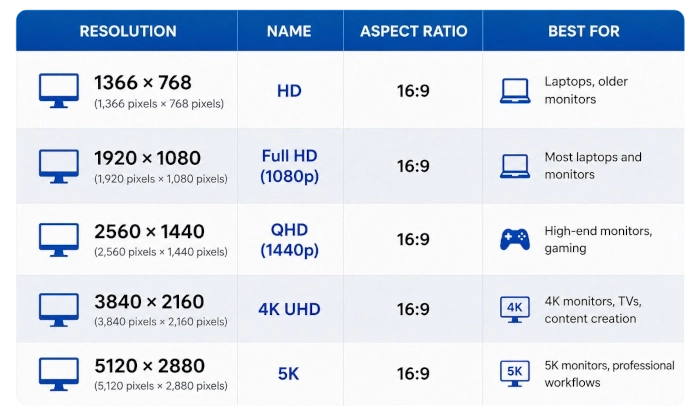
Most desktop and laptop users today have either Full HD or 4K displays
How to check your screen resolution
On Windows
- Right-click on your desktop.
- Select Display settings.
- Look for Display resolution.
On macOS
- Open System Settings.
- Click Displays.
- Your current resolution will be shown.
Once you know your screen resolution, choose a wallpaper with the same or a higher resolution.
Should you always download 4K wallpapers?
Not necessarily.
If your monitor has a Full HD resolution, a high-quality 1920 × 1080 wallpaper will already look excellent.
However, if you own a QHD, 4K, or larger monitor, downloading 4K wallpapers will provide noticeably sharper details and better overall image quality.
Benefits of high-resolution wallpapers
HD and 4K wallpapers offer several advantages:
- sharper details;
- richer colors;
- smoother gradients;
- improved image quality on large displays;
- a cleaner desktop appearance.
Modern monitors deserve wallpapers that fully showcase their capabilities.
Where to download the right wallpaper resolution
Always check the resolution before downloading a wallpaper. Reliable wallpaper websites usually offer images in multiple resolutions so you can choose the version that best matches your monitor.
On Purewall, wallpapers are available in high quality to ensure excellent visual results on every desktop setup.
Choosing the correct wallpaper resolution is one of the easiest ways to improve your desktop experience. A properly sized wallpaper looks sharper, cleaner, and much more enjoyable to use every day.
Before downloading your next wallpaper, take a moment to check your screen resolution and choose the version that fits your display perfectly.